Skift mellem mine forskellige GoDaddy Conversations -indbakker
Hvis du har mere end én venture tilknyttet GoDaddy Conversations, kan du nemt skifte mellem dine forskellige Conversations samlede indbakker for at læse meddelelser til den pågældende venture.
Note: The GoDaddy mobile app is not available with free Conversations plans.
- Any time a customer sends a message through any of the channels you’ve connected to GoDaddy Conversations, you’ll receive a notification on your mobile phone. The notification will tell you which business it’s for and who it’s from.

- Tap the notification to be taken directly to the conversation thread in the GoDaddy mobile app, from where you can respond to the message.
- To switch to an inbox for a different venture, from your inbox, tap your business name at the top of the screen. A list of your businesses will show.
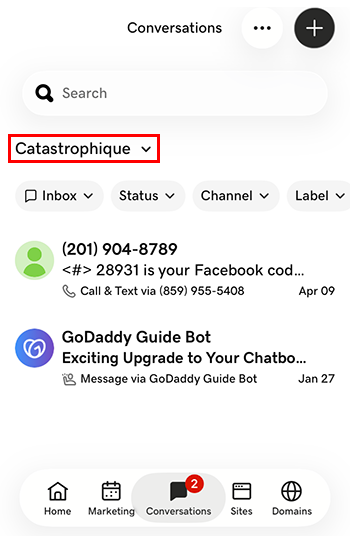
- Tryk på det projekt, du vil skifte til. Du føres til indbakken for det projekt.
- I en webbrowser skal du gå til for din GoDaddy -produktside .
Hvis du har den uafhængige version af Conversations, skal du udvide Conversations Unified Inbox . Til højre for din Conversations -plan skal du vælge Webindbakke .
ELLER
Hvis du har et Websites + Marketing -abonnement, skal du rulle til Websites + Marketing og vælge Administrer ved siden af dit site. I menuen til venstre skal du udvide Conversations .
- Vælg Indbakke . En liste over dine ikke -arkiverede samtaler vises.
- Vælg en meddelelse, der skal føres direkte til samtaletråden, hvorfra du kan svare på meddelelsen.
- To switch to an inbox for a different venture, on the far left of your screen, select the venture you want to switch to. You’ll be taken to the dashboard for that venture.
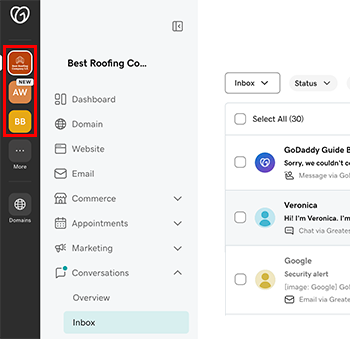
- I menuen til venstre skal du udvide Samtaler og derefter vælge Indbakke , der skal føres til indbakken for det projekt.